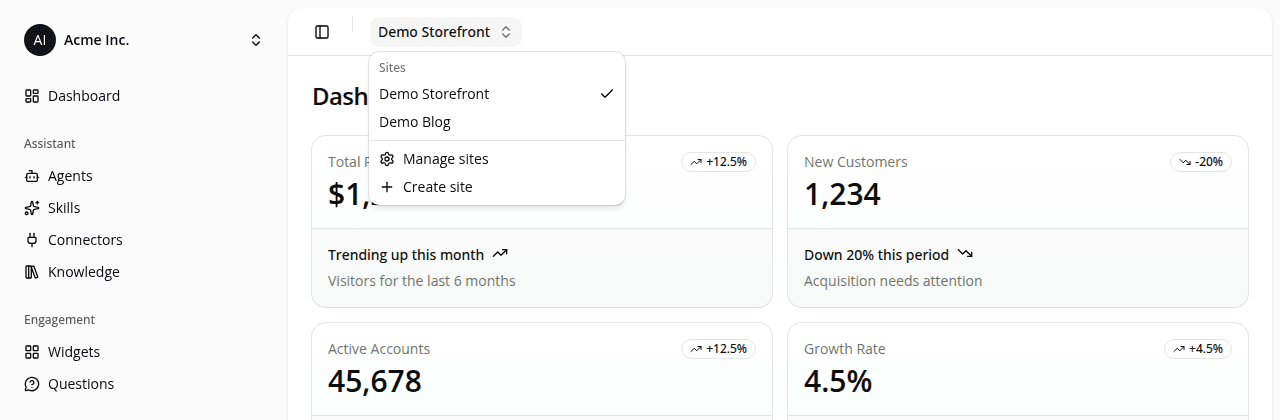
Sites: one workspace per storefront
AddedSites are now a real part of the dashboard. A site is the workspace for one storefront: create one per store, market, or brand you run the assistant on, and everything you configure (agents, conversations, connectors) lives under it rather than loose at the organization level.
Give a site a name and pick its platform (Shopify, PrestaShop, WooCommerce, or Custom). Manage your sites (create, rename, change platform, delete) from the sites list.
A new site switcher in the dashboard header lists your organization's sites and lets you jump between them; switching keeps you on the same tab (Agents stays Agents) under the new site. It only shows up while you're working inside a site: organization-level pages like Settings don't have a "current site" to switch.
Creating an agent or a connector from inside a site's workspace attaches it to that site. Deleting a site detaches its agents and connectors instead of deleting them: their configuration and history stay intact, they just become unassigned.
The public REST API follows the same shape: every resource now nests under a site, for example /api/v1/sites/{siteId}/agents. See Sites and Authentication.
Resources