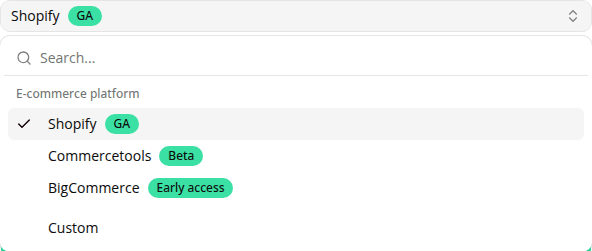
Native connectors for commercetools and BigCommerce
AddedTwo new connector types join Shopify and Custom on the Connectors page:
- commercetools: point at your own deployed Commerce MCP server with a pre-issued bearer token. Only a curated set of product/category search and cart tools is enabled by default; commercetools' broader back-office tool surface (payments, business units, approval flows, and anything added later) stays off until you turn it on for that connector.
- BigCommerce: paste the store-specific MCP URL from your BigCommerce control panel (Settings → Early access → MCP Integration). No token needed today: guest shopping only.
Both platforms' official MCP servers are pre-GA upstream: commercetools describes Commerce MCP as under development, and BigCommerce's is in beta behind its Early Access toggle. To make that visible, every connector now shows its type's upstream status (GA, Beta, or Early access) next to its type badge in the connectors list and on the connector form.
See Connectors for setup steps, and for Custom-connector recipes if you're on a platform without a native connector yet (Adobe Commerce, WooCommerce, Salesforce Commerce Cloud, PrestaShop, SAP Commerce Cloud, or Wix).
Resources