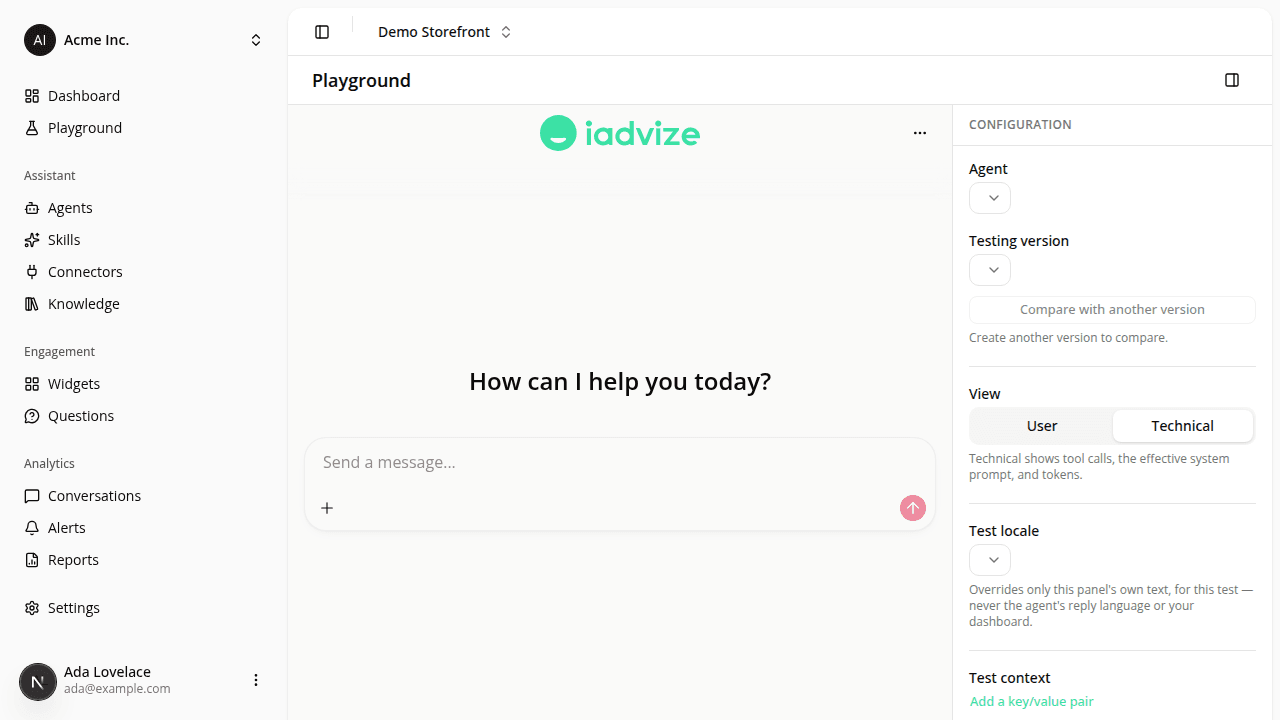
A standalone Playground page, with side-by-side version comparison
AddedThe Playground is no longer buried in a tab on each agent's page; it's now its own page, opened from Playground in the sidebar.
- One place to test any agent. Pick the agent and version from the configuration panel (docked to the side on desktop, a bottom sheet on mobile) instead of hunting for the right agent's detail page first.
- Jump straight in from an agent. A Test in Playground button on an agent's detail page (and on each version in its history) opens the Playground with that agent, and that exact version, already selected.
- Compare two versions side by side. Compare with another version splits the chat into two panes on the same agent, each running a different version. Send one message and both panes answer it independently, so you can see exactly how a candidate stacks up against your champion before you promote it.
- Add test-only context. Freeform key/value pairs (e.g.
product_id: SKU-1182) let you simulate a page or situation for the assistant during a test conversation; shoppers never see this, and it never reaches your agent's public link. - Preview the chat panel in another language. A test-language selector lets you check the panel's own wording in English, French, or German, independently of your own dashboard language and of the language the assistant actually replies in.
Playground conversations still show up under Conversations with their Playground badge, exactly as before.
Resources