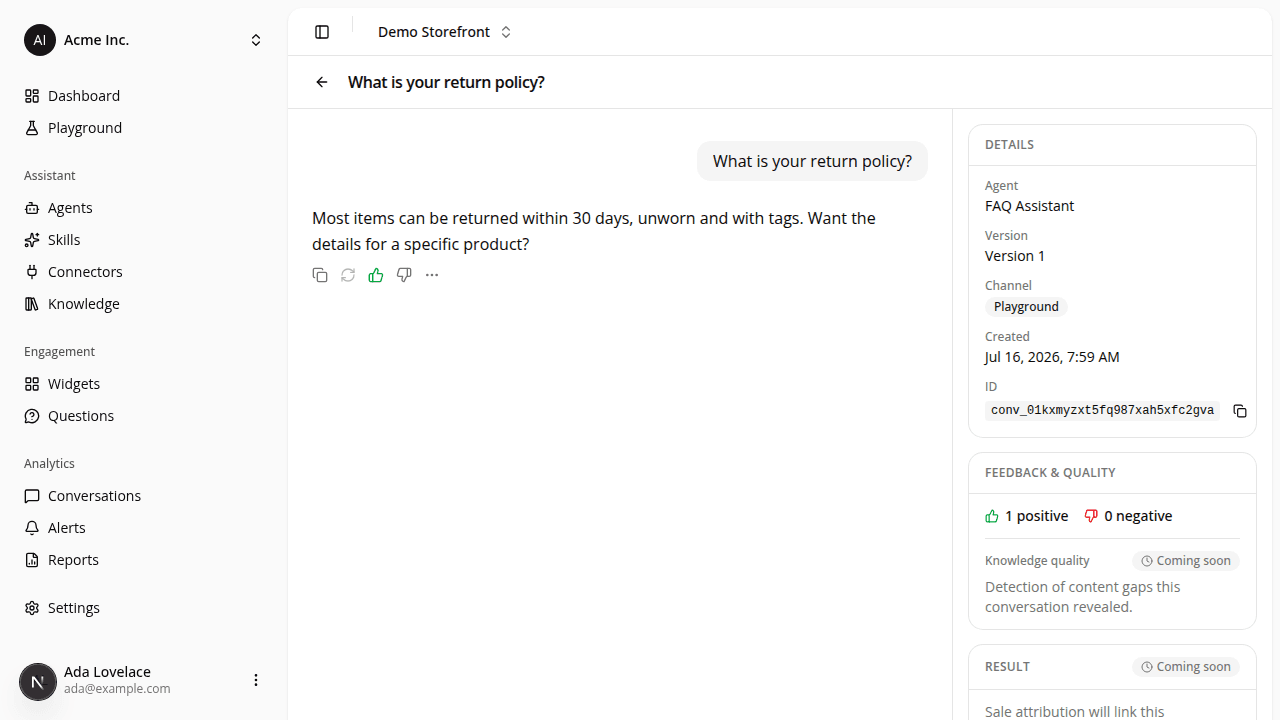
Conversation detail redesigned around the transcript
ChangedOpening a conversation now leads with the transcript as the main column, with the conversation's metadata moved into a rail beside it. On a wide screen the rail sits to the right of the transcript; on a narrow screen it opens from a Details button in the header, so the messages stay the focus at every width.
- Full-height, scrolls in place. The page fills the screen: the transcript and the rail each scroll on their own, so a long conversation no longer pushes the whole page down. The transcript opens on the first message.
- Details. The rail's Details section carries what the old full-width card showed: the agent and version the conversation ran through (each linking back to the agent), the channel, when it was created, and the conversation id with a copy button.
- Feedback & quality. A new section shows this conversation's message ratings as a thumbs-up and thumbs-down tally: the same counts as the Conversations table's Feedback column, without opening each message.
This is a layout change: the transcript itself is unchanged and still read-only.
Resources