Embed the assistant on your own storefront
AddedYou can now put the assistant directly on your storefront with a single script tag.
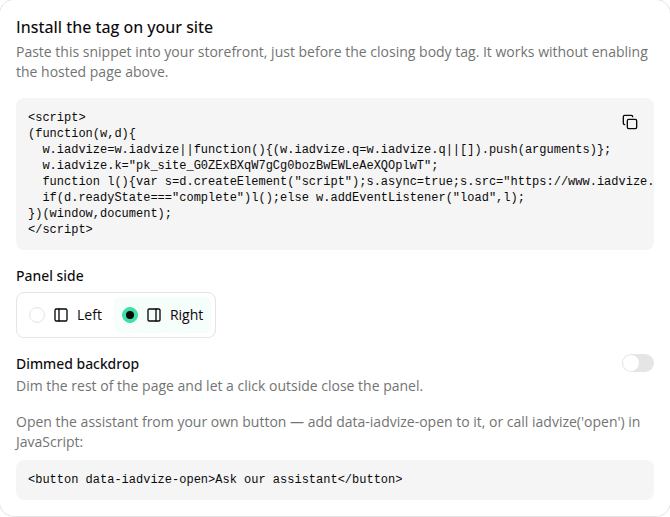
Open the site's Settings → Public access page and copy the snippet from the new Install the tag on your site card. Paste it once into your storefront (before </body>), and the assistant loads in a full-height side panel that slides in from the edge of the screen. The snippet carries the site's public key and works without turning on public access; that toggle still only controls the hosted share link.
You choose what opens it. There's no built-in launcher bubble in this version. Wire the panel to any element with a data-iadvize-open attribute, or call iadvize('open') from your own code. Pick which side it docks to with the Panel side chooser on the Install card (it rewrites the snippet) or at runtime with iadvize('set', { position: 'left' }), close it, and listen for open/close events.
For the panel to answer, the site needs a default agent with a published (champion) version. The Install card warns you when one isn't ready. The tag always serves that agent's current champion, so promoting a new version needs no change on your side.
This is the first embed step. A launcher widget, durable visitor tracking, and cross-page conversation resume are coming in later releases.
Resources