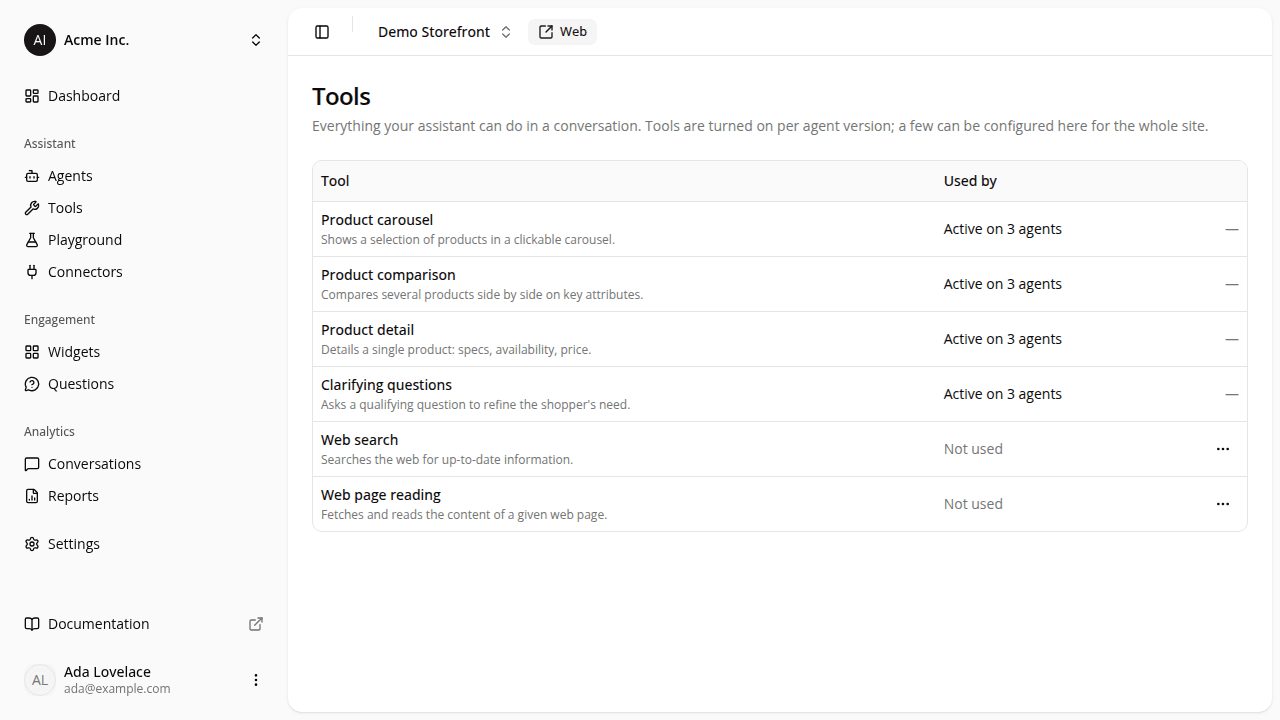
Web search and page reading move to a new Tools page, each with its own settings
ChangedConfiguring what the assistant can reach on the web used to sit in a tab of a site's settings. It now has its own home: Tools in the dashboard sidebar, under Assistant.
- A catalogue of everything your assistant can do. The Tools page lists all six chat tools (product carousel, product comparison, product detail, clarifying questions, web search, web page reading) with a one-line description each and a Used by column: Active on N agents, or Not used. The count reflects your live versions only, so a tool you're trialling on a draft or candidate version still reads as not used. Nothing on this page turns a tool on or off; that stays part of an agent's configuration version.
- One configuration page per web tool. Web search and web page reading each get their own page, reached from their row. Web page reading's page also holds its JavaScript-rendering setting.
- The two domain policies are now fully independent. The old "different rules for page retrieval" switch is gone: what you set for web search no longer changes page reading, and the other way round. Your current restrictions carry over exactly as they were, but from now on, a rule you want on both tools has to be saved on both pages.
- Each card saves itself. Nothing is written until you press the Save in the card you edited, so you can review a domain list before committing it. Web page reading has two cards (its domain policy and its JavaScript-rendering setting), with a Save each, and they commit separately: saving one neither commits what you'd started changing in the other nor resets what the other already had saved. Two more consequences: widening a policy back to open web no longer asks you to confirm (Save is the deliberate act), and leaving a page with unsaved edits discards them.
- A cog next to the two web tools in a version's checklist. In an agent's configuration version, the Web search and Web page reading rows under Chat tools now carry a small cog that opens that tool's configuration page. It only takes you there: clicking it never ticks or unticks the tool.
- Access is narrower than before. These pages need the Agents: View permission to open and Agents: Edit to save. Previously any member of your organization could change the domain policy. Both built-in roles, Admin and Member, still have these permissions.
The old address, /dashboard/sites/{siteId}/settings/tools, no longer exists and doesn't redirect. Update any bookmark you kept.
Resources