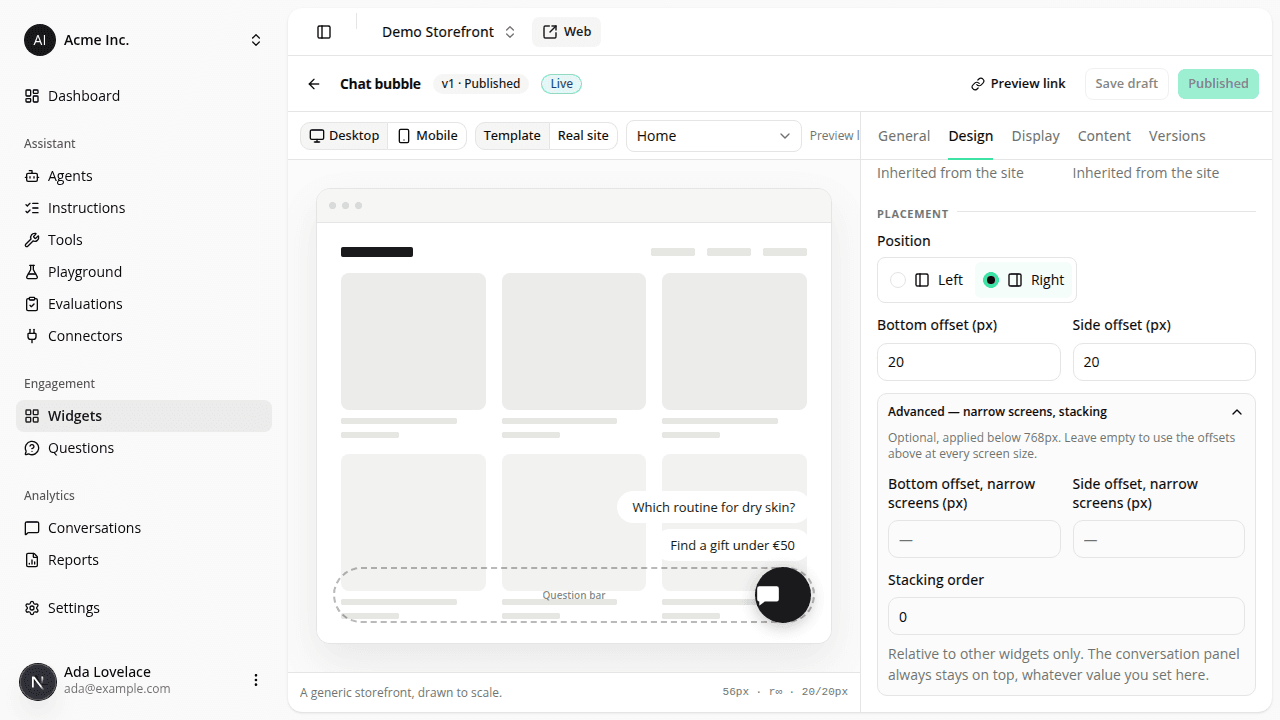
A launcher widget's side is now its own setting, independent of the panel
ChangedTwo changes to how a launcher engagement widget is positioned:
- Position is now its own field. Until now, a launcher bubble always docked to whichever side you'd configured the conversation panel to open from (Settings → Public access → Panel side). Each launcher widget now has its own Position (Left/Right) on its configuration page, set independently of the panel.
- A new Stacking order field. Every widget (launcher or question bar) now has a Stacking order: a small rank relative to your other widgets, for when two overlap. Whatever you set, the conversation panel always renders on top of every widget, so this can't accidentally cover it.
Check your existing launcher widgets after this ships
A launcher widget you created before this change has no Position saved yet, and now defaults to right until you open it and save it, even if your panel opens from the left and your launcher used to dock there too. If your site's panel side is Left, open each of your launcher widgets on the Engagement Widgets page, set Position to Left, and save. Otherwise it renders on the right after this ships.
The Engagement Widgets edit page is also reorganized into three cards (General, Design, and Display rules) instead of one; nothing you'd already configured changes as a result. The Install the tag card on Settings → Public access no longer links back to this page: engagement widgets are managed exclusively from Engagement → Widgets in the dashboard sidebar.
Resources