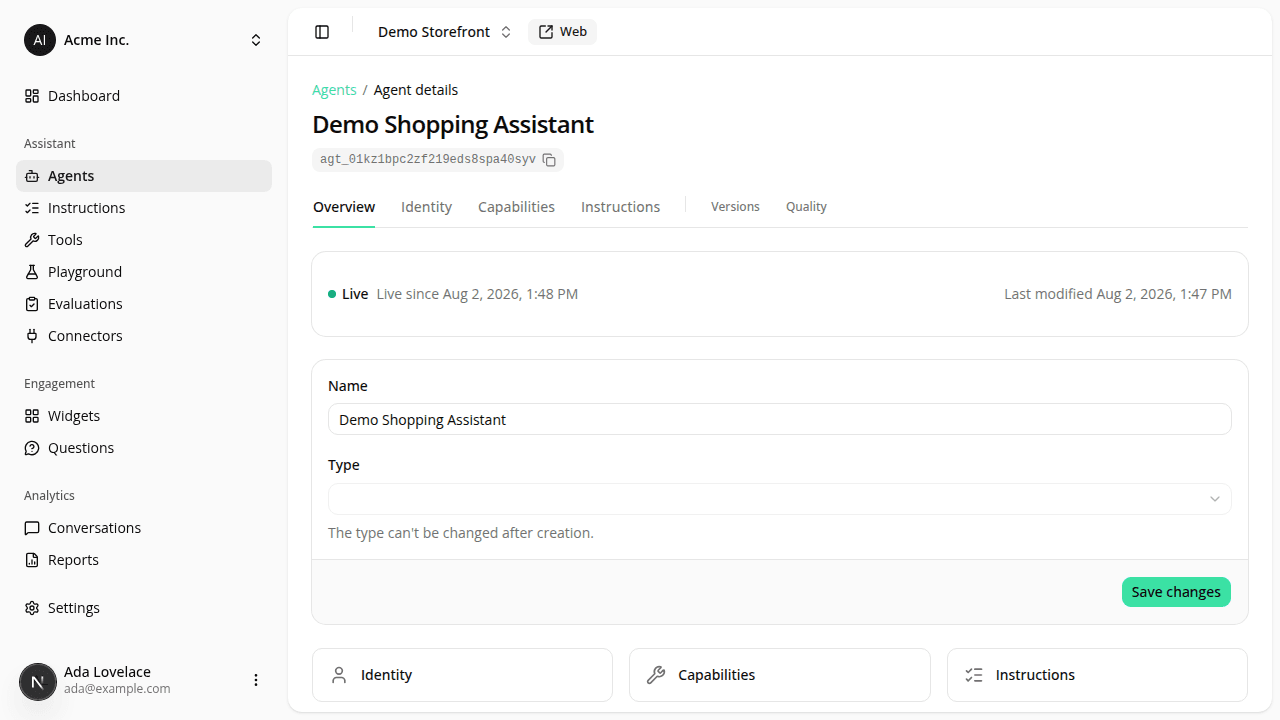
Agent detail page redesign: one editing surface, a clearer save bar
ChangedThe agent detail page is reorganized around what you're actually trying to do:
- Overview, Identity, Capabilities, and Instructions are now the four main tabs. Versions and Quality (renamed from Evaluation) sit after a divider for less frequent visits. The Playground and Insights tabs are gone from here. Test a version from its row's ⋯ → Playground action on the Versions table, or its own read-only page.
- Renaming an agent works from any tab. The agent's name is now an inline, editable control in the page header, next to its read-only type badge, so you can rename it from Overview, Identity, Capabilities, Instructions, Versions, or Quality, not just from a dedicated form.
- Overview is now a dashboard, not a config dump. A status card shows whether the agent is live and since when, plus a "Test it on Playground" shortcut straight to the champion version. Below it, the Identity/Capabilities/Instructions quick-link cards each show that section's real live facts (the identity's display name and whether it has a custom avatar, the engine plus tool/capability/connector counts, the instruction block count) instead of a bare link. Two more cards show actual usage: conversations from the last 7 days with a link to the full list, and your latest Quality evaluation run with its score and a link to the run. A compact "coming soon" block (performance, A/B testing, engine proposals) is still there for what's not built yet. The old Settings tab is gone: a bookmarked Settings link now opens Overview.
- Editing is direct. Open Identity, Capabilities, or Instructions and you're already editing the agent's current setup. There's no more separate page for "creating a new version" first. Switching between the three tabs never loses what you've typed.
- Saving is now two explicit actions. Save creates a draft (no impact on what shoppers see); Publish makes it live, with a quick "Confirm publish?" second click so it's never one accidental click away. Save as candidate is still available from a small menu next to Save. All three actions stay disabled until you've actually changed something, so an idle click on Save or Publish can no longer mint a redundant, identical version. This also applies to your assistant's name and avatar, now edited from the Identity tab: like everything else here, Save keeps that change in a draft; only Publish puts it in front of shoppers.
- You won't lose unsaved work by accident. Navigating away from Identity/Capabilities/Instructions with unsaved changes asks whether to save a draft, discard, or stay; closing the tab or reloading shows your browser's own "leave site?" warning instead.
Resources