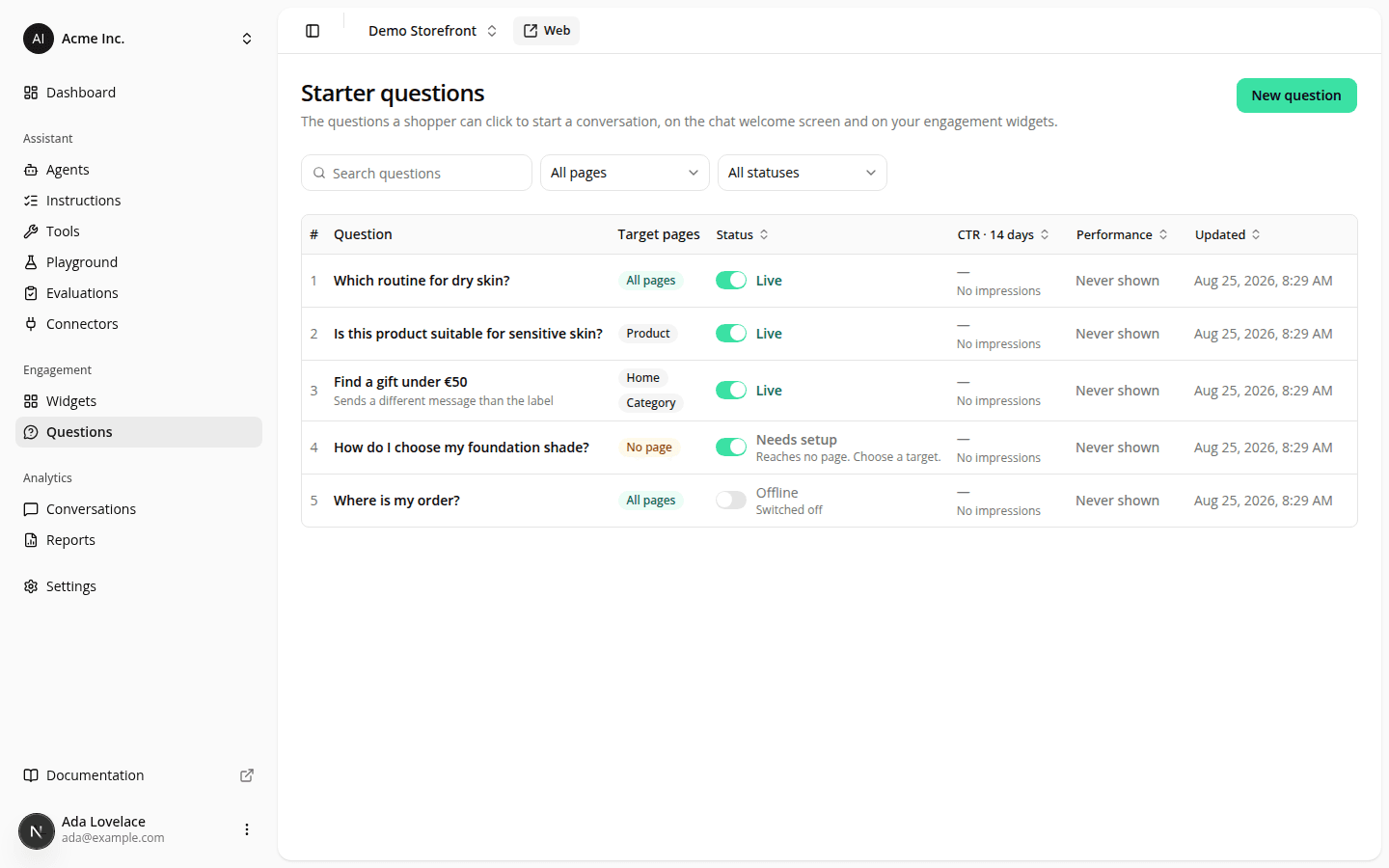
See which starter questions are actually earning their slot
AddedStarter questions shipped with no way to tell whether any of them worked. At most three questions ever win a slot per page, so order was quietly deciding what shoppers saw, and until now, that decision was made blind. Every question that actually renders is measured now: one impression when it's shown, one click when a shopper taps it.
Two new columns on the Questions list
CTR · 14 days shows a sparkline, the click-through rate, and the raw impressions · clicks behind it. Performance turns that into a verdict: a plain-language read of whether a question is worth its slot:
- Workhorse: enough impressions to trust the rate, and it's at or above your site's own average. Keep it near the top.
- Underperforming: enough impressions to trust the rate, and it's below your site's own average. It's occupying a slot. Rewrite it or move it down.
- Promising: too few impressions to be sure yet, but the rate already looks strong. Move it up and the next period will tell you.
- Not enough data: too few impressions to be sure, and the rate doesn't stand out either. Give it time, or move it up.
- Never shown: zero impressions in the last 14 days, always paired with why: too recent, disabled, no page types, no text, or it never wins a slot against higher-ordered siblings.
"Enough impressions" is 200 or more; "your site's own average" is your own click-through rate over the same 14 days, never an industry number. A verdict never appears without the numbers it came from. No bare label, ever.
Both columns sort. Move up / Move down live in the same row, so a question that never wins a slot can be fixed on the spot.
The same numbers on the question's own page
Open a question and a new Performance block sits above the wording: the verdict, impressions/clicks/CTR, a 14-day rate trend with hover detail, and a breakdown by surface (welcome screen, question bar, chat bubble) so you can see where the taps actually come from. A Full report link jumps to the Engagement report for the same question over whatever range you pick there.
A new section on the Engagement report
By starter question is a question × surface matrix, heat-scaled by click-through rate, most-shown first. Each cell carries the rate plus the impressions and clicks behind it; a surface a question never reached reads "Not shown here," never a 0% rate. A count at the bottom names how many questions in the library were shown to nobody in the selected range. Unlike the list and the question page, this section follows the report's own date range, not the fixed 14 days.
The report's "coming soon" notice is also corrected: a per-widget comparison was never blocked by missing data (every event already carries which widget produced it); it's the reporting surface itself that hasn't been built yet. The notice now says so, alongside the two gaps that are genuinely data-blocked: a page-type breakdown and a link from a question to a sale.
Two things that changed to make room
The list's Languages column and filter are gone. The Status cell's own hint ("Shows in FR only") already named what was missing, and dropping the pair paid for the two new columns. The advisory that used to warn "N questions compete for this page type" is also gone: a question that loses that contest now reads Never shown with "never wins a slot" as the reason, right next to the Move up action that fixes it.
Not in this version
No breakdown by page type, no per-widget comparison, no link from a question to a sale, and no per-language split: a question's rate is measured across every language it's shown in, combined.
Resources