A reorganized sidebar, one shared report range, and record lists under every report
ChangedThree changes to how you get around the dashboard, shipped together because they touch the same navigation.
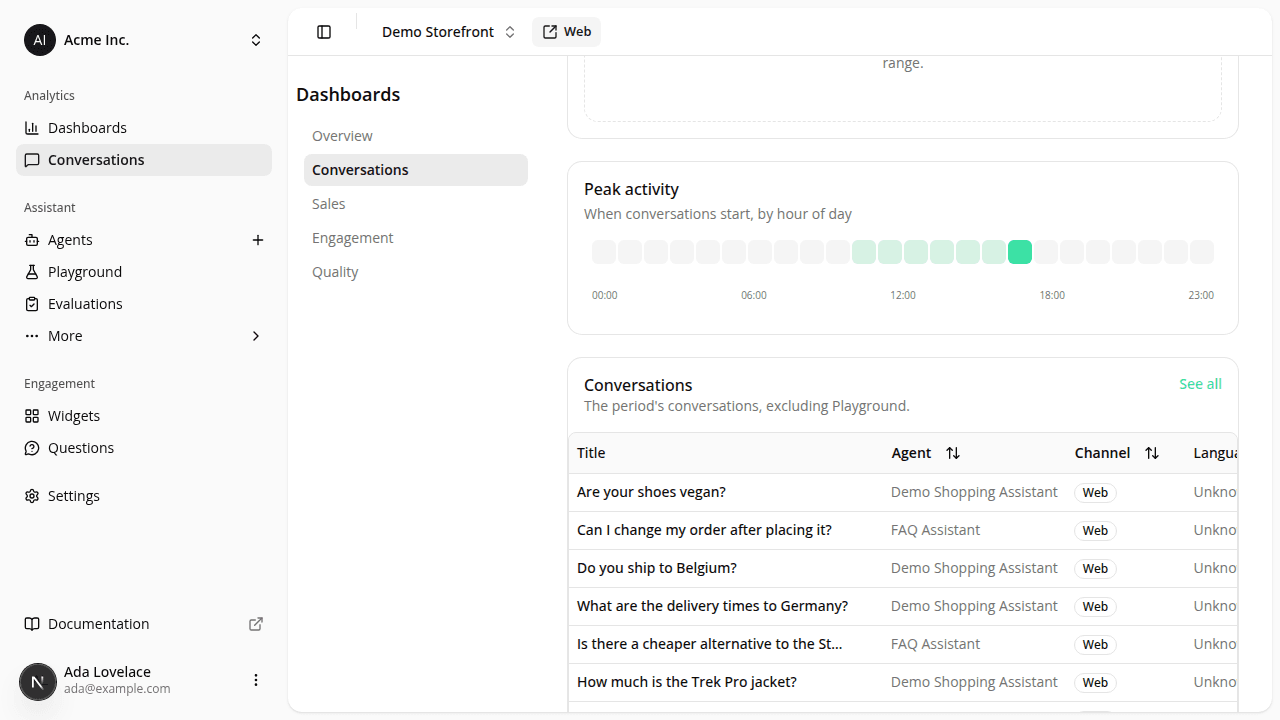
Reports now live under one Dashboards section. Overview, Conversations, Sales, Engagement and Quality used to be scattered across a "Dashboard" page and a separate "Reports" area. They're now one section (Dashboards in the sidebar) with the five reports as sub-pages sharing the same date range picker and compare-to-previous-period control, so picking a range once carries across all of them. The site overview you used to land on from Dashboard now lives at the section's root.
Assistant opens straight into your agent, not a list first. The sidebar's Assistant item used to send you to a list of agents you then had to click into. It now goes straight to the workspace: your only agent if you have one, your site's configured default if you have several, or its most recent one if neither is set. A + next to the item lets you create another agent without detouring through the list, and if you have several agents, a selector column beside the workspace lets you switch between them without leaving it. Nothing changes if you have zero agents yet: you still land on the create screen.
Four reports now show you the records behind the numbers. The Overview, Conversations, Quality and Engagement reports each gained a list below their charts (the actual conversations, ratings, or funnel events the period's figures are computed from), with a See all link that opens the full table, filtered to the same date range you were already looking at. Where that full table already existed (the conversations list), it's the same one; where it didn't have a report-level home before, it does now.
Feedback, Exposures and Events moved out of Conversations. These three tables used to sit together under a "Conversations" sub-navigation, alongside the conversation list itself. They've moved to where you'd actually use them: Feedback is now reached from the Quality report (it's the report about answer quality, after all), Exposures from the Engagement report (it's the raw data behind that report's funnel), and Events (the raw impression/click debug table) moved to a new Diagnostics page under Settings, since it's a developer-facing table, not something you'd read while reviewing reports. A bookmark or link to any of their old addresses still gets you there; it just redirects to the new one first. The Conversations sub-navigation itself is gone: the conversation list is now a single page with no tabs.
The sidebar's separate "Conversations" link to the full conversation list is gone. Before this, the sidebar had two ways into conversations: a Conversations shortcut that opened the raw list directly, and the Conversations report reached through Reports. Now there's one Conversations item, and it opens the report. The same list is still one click away, through that report's See all link, which carries the report's date range with it.
Nothing here changes what a shopper sees: this is all dashboard navigation.
Resources