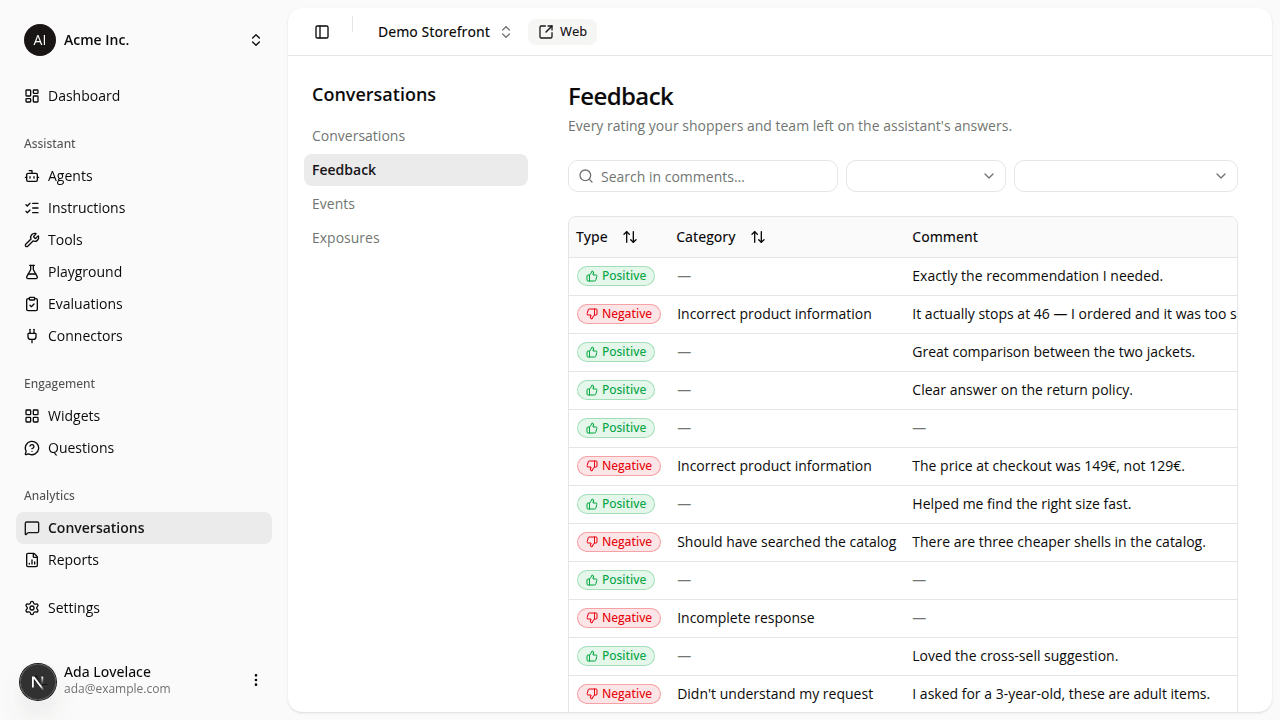
Triage every rating in a dedicated Feedback table
AddedThe Conversations section now has two tabs: Conversations (the transcript list, unchanged) and a new Feedback table. Instead of opening conversations one by one to find the ratings, you get one row per rated message across the whole site.
Each row shows the rating type (positive or negative), its category, the comment, the conversation it came from, and when it was given. Above the table:
- Search filters by comment text as you type.
- Filter by type narrows to positive or negative ratings.
- Filter by category narrows to one issue category, and since only negatives carry a category, picking one shows negatives alone.
Sort by type, category, or date (newest first by default), page through 20 at a time, and click any row to jump straight into that conversation's transcript, scrolled to the exact answer that was rated. Your search, filters, sort, and page all live in the URL, so a link reopens the same view. On a phone, the filters collapse into a single Filters button.
This is the drill-down behind the Conversations table's feedback count: the count tells you which conversations were rated, the Feedback table tells you what each rating actually said.
Resources