Origin allowlist, a usage meter, and rate-limit protection for your public surfaces
AddedThree changes ship together to get the embed tag and public link ready for real storefront traffic.
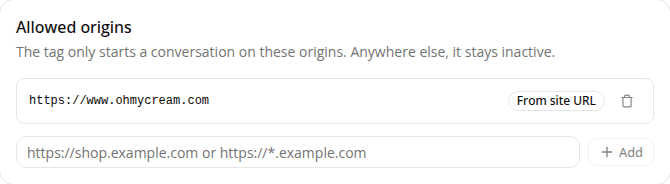
The embed tag now checks where it's running. Open a site's Settings → Public access page and you'll see a new Allowed origins card. The panel only starts a conversation on an origin from this list; anywhere else, it shows an inert message naming the refused origin instead. Your storefront's own address is covered automatically: a site's URL is now required (on create and edit), and its origin is added to the list for you, marked non-removable. You can add more origins yourself, including wildcard subdomain patterns (https://*.example.com), and add http://localhost:PORT to test the tag from a local page. The Install the tag card stays hidden until at least one origin is allowed.
A monthly usage meter. A new Billing page (/dashboard/settings/billing) shows your organization's conversation usage this month against its quota, with a reset date and an overage indicator. The quota is soft (going over it never stops the assistant from answering, it's a usage indicator, not a limit), and it's set by iAdvize, not editable here. The page only shows up for a role with access to it (Admin, by default).
Rate-limit protection on the public chat endpoint. Both the public link and the embed tag are now protected by two layers: a per-visitor limit that stops a single abusive source without affecting normal traffic, and a per-organization ceiling set high enough to never throttle legitimate usage. See Rate-limit protection for the configured values.
Resources