Write your own welcome message and conversation starters, per language
AddedA site now declares which languages its shoppers speak, from a fixed set of six: Français, English, Deutsch, Italiano, Español, Nederlands. Manage this from the new Languages page in site settings (Settings → Languages): enable the languages you need, pick a default, and save. A brand-new site starts with English enabled and set as default.
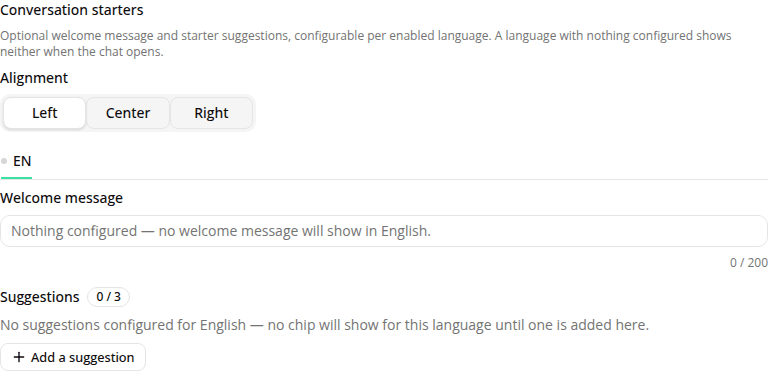
Every agent version can now write its own welcome message and starter suggestions, per language. In the version editor's new Conversation starters section, for each language the site has enabled you can set an optional welcome message (up to 200 characters) and up to 3 clickable suggestion chips, each a button label (up to 60 characters) and an optional, distinct message to send when clicked (up to 500 characters; leave it blank and the button label itself is sent). A single alignment setting (left, center, or right) positions the welcome message and chips for the whole version, across every language. Like the rest of a version's configuration, this content is immutable: editing it mints a new version.
This replaces the old fixed, generic opening screen. Every site used to show the same four hardcoded prompts and a generic "welcome" title, in English, French, or German only, identical for every agent. That's gone: a language with no welcome message and no suggestions configured now shows a bare composer, with nothing above it. If you haven't configured anything yet for a language your shoppers use, this is expected: go add it in the version editor.
The Playground's language selector previews this content directly: pick one of the site's enabled languages (or Auto, for the site's default) to see exactly what that language's welcome message and suggestions will look like, alongside the chat panel's own translated text.
This reaches the hosted public link and the embedded web tag. It has no effect on the language the assistant replies in; that's still inferred from what a shopper types, on its own.
Removing a language from a site permanently deletes its welcome message and suggestions from every agent version on that site (draft, candidate, champion, and archived). The "Languages" card warns you and asks for confirmation before saving a removal that would delete real content.
Resources