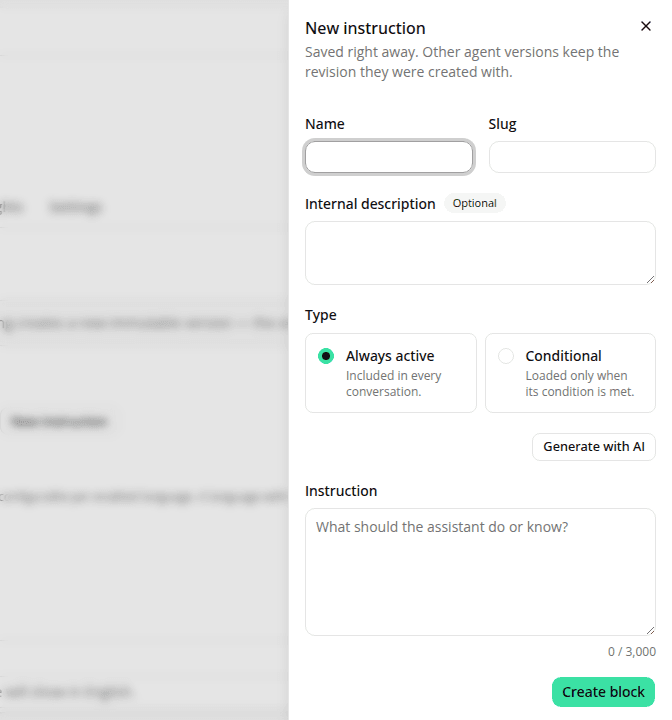
Write an instruction without leaving the version editor
AddedConfiguring an agent used to mean bouncing between two screens: you picked instruction blocks in the version editor, but could only write or fix one on the Instructions page. Not anymore.
In the version editor's Instructions section:
- New instruction opens the authoring form in a side panel over the page. Saving creates the block on the site and adds it to this draft's selection, pinned to its first revision.
- The pencil on a selected block's row opens that block for editing. Saving appends a revision as usual and re-pins this draft to it, so the version you're building carries what you just typed instead of the older text. Blocks the draft doesn't select have no pencil: a revision on one of those wouldn't change anything here.
- Generate with AI works from the panel, as a dialog on top of it. Your form stays filled behind it, and closing the panel never saves or resets the version draft underneath.
Every other agent version is untouched: each one keeps the exact revision it was created with, including a champion serving shoppers right now.
Two things to expect. A block you create in the panel is saved immediately, so if you then abandon the version draft, the block still exists in the site's Instructions list; delete it there if you don't want it. And the panel deliberately offers no revision history and no delete; both stay on the Instructions page, where the "in use by a live agent" warning lives.
Resources