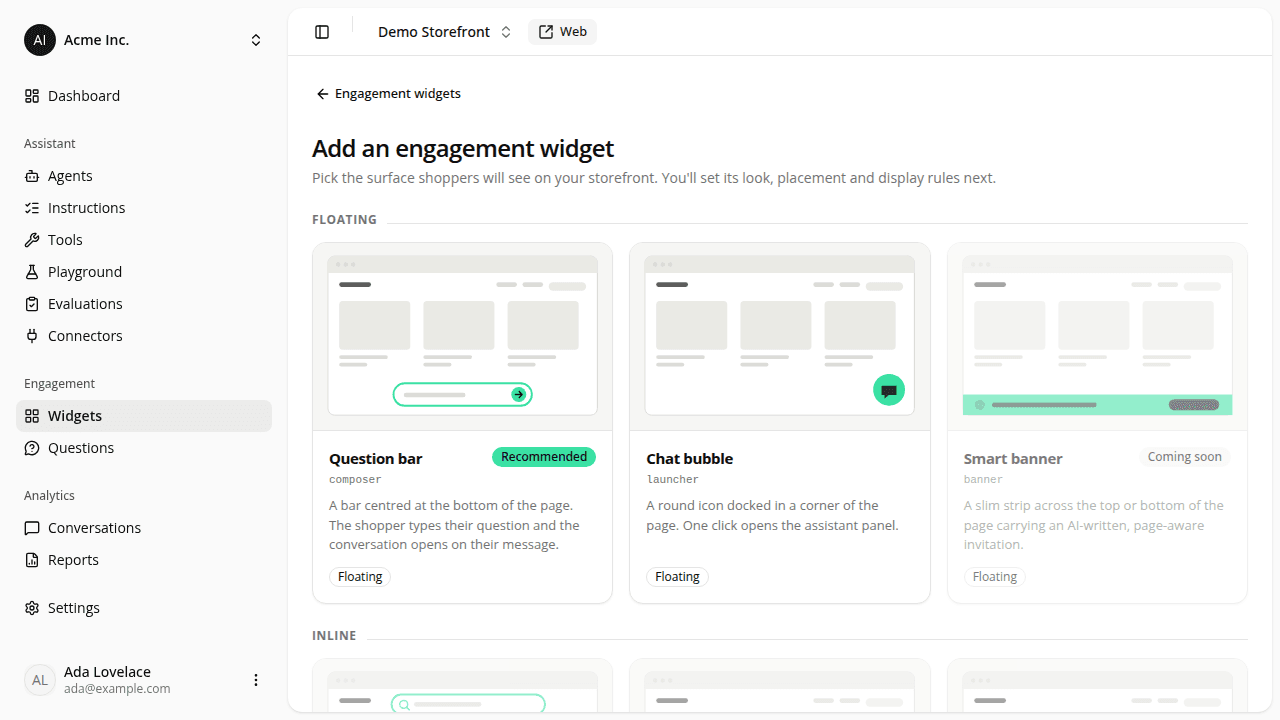
Pick an engagement widget from a catalog of formats
ChangedAdd an engagement widget used to open a form: a two-option Type dropdown, an optional description, a Create widget button. You had to know what "Launcher" meant before you could choose it.
It's now a catalog. Seven formats, each on a card with a schematic of where it lands on a shopper's page, grouped into three sections: Floating, Inline, Custom. Selecting a card creates the widget immediately and drops you on its page, where the description now lives alongside everything else you configure.
What you can create today is unchanged: Question bar (tagged Recommended) and Chat bubble. The four other formats (Smart banner, AI search bar, Suggested questions, Button) are on the page as Coming soon cards. They're there so you can see what's on the way; they can't be clicked or reached with the keyboard.
The Custom widget card is not a coming-soon card. Building your own engagement surface against the published CSS contract and the tag's open command already works, so that card is a link to Style engagement widgets with CSS rather than something that creates a widget.
Picked the wrong card? Nothing is live (a new widget is created inactive with no page types), so delete it from the ··· menu on its row.
The Launcher is now the Chat bubble
The floating round button is called Chat bubble everywhere in the dashboard: the format catalog, the Type column and field, the permission description in Roles, and the Engagement report's Chat bubble shown KPI and chart line.
Nothing changes in your page code
The rename is a label. data-iadvize-launcher-host, the
--iadvize-launcher-* custom properties, the launcher shadow parts, the
page-side launcher override, and the widget type the tag reads all keep
the name they shipped with. No stylesheet and no snippet needs editing.
A widget now tells you when it isn't live
Two separate choices stand between creating a widget and shoppers seeing it: it has to be Active, and it needs at least one page type checked (or Show on all pages on). That hasn't changed (nothing unconfigured reaches a live storefront), but the widget's page no longer leaves you to work it out.
While either is missing, the page opens with a "This widget isn't live yet" notice naming exactly what's left: both conditions, just the switch, or just the page types. It updates as you flip the switches, before you save, and disappears once the widget can actually render.
Resources