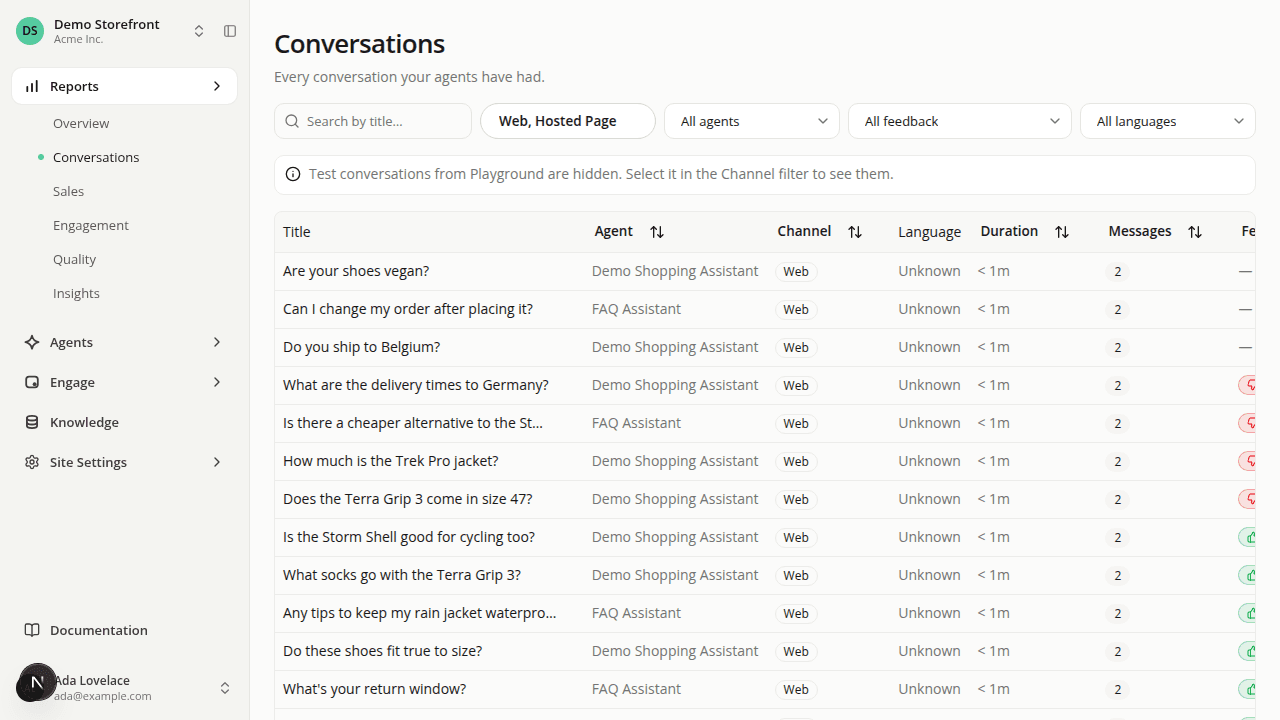
Conversations are reachable again, plus a Channel filter across your reports
ChangedThe full conversations list is reachable again. The sidebar's Conversations item, under Reports, had been pointing at a report instead of the actual list. You could only get to every conversation by hand-editing a URL. It now opens the real thing directly: search, filter, and open any conversation without going through a report first.
A new Channel filter lets you choose which channels a page counts. Conversations, Overview, Insights and Quality now all carry the same Channel filter: check any combination of Web, Hosted Page, and Playground. It defaults to everything except Playground, so your own testing doesn't mix into figures meant to describe real shopper activity, and it's remembered as you move between these pages for your browsing session. Engagement doesn't have it (Playground never generates the data it reads), and Sales doesn't have it yet (no data exists there yet either).
The conversations list tells you when it's hiding something. When your current Channel selection is hiding Playground conversations that exist in the period you're viewing, a notice says so and points at the filter. It disappears on its own once you widen the filter or there's nothing left to hide.
The Conversations report is renamed Insights. It's now the last item in the Reports section, at a new address, and no longer shows an embedded conversations list of its own. Use the Conversations page for that. There's no redirect from its old address.
Quality now respects the Channel filter too. Before, it always counted feedback from every channel, including your own Playground testing, with no way to change that. It now uses the same filter and the same default as every other report. If the only feedback you have so far is from your own testing, the report opens empty until you check Playground back on.
The first item in Reports is now called Overview (it used to say "Dashboards").
Resources