Read a conversation's labels in a new Analysis section
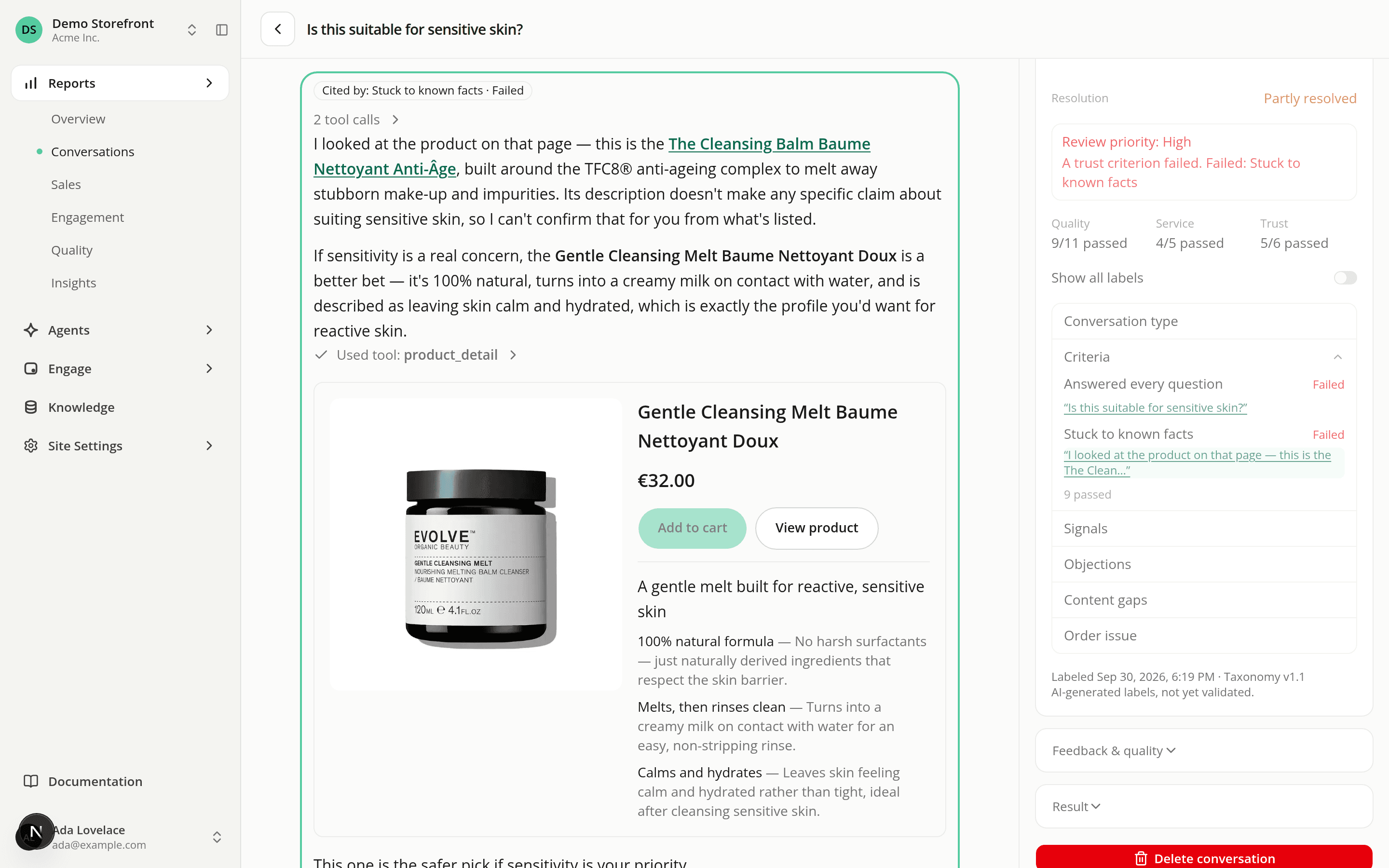
AddedThe labels the AI judge records about each conversation are now visible. Open a conversation and look at the Analysis section of the rail beside the transcript. It's marked Beta: the labels are AI-generated and not yet validated.
What it shows:
- The resolution of the conversation, and a review priority callout when the judge found something worth a person's review: High for a failed trust criterion, Medium when the need wasn't met, the shopper was frustrated or a person was needed, Low for an unneeded fallback.
- Quality, Service and Trust scores as passed over judged, for example "3/4 passed".
- The labels, grouped by block. By default you see only what needs attention: failed criteria and the labels answered yes. A Show all labels switch lists everything. Failed criteria are red, passed ones green and content gaps amber. Everything else, objections included, reads in plain text.
- Links to the evidence. Click a cited message and the transcript scrolls to it and outlines it, with the label that cited it.
- When labels are missing or out of date, a sentence says why: still waiting (30 to 90 minutes after the conversation goes quiet), not eligible (with the reason), or last attempt failed (with its code). When the conversation continued after it was labeled, or the shopper objected after it was labeled, the earlier labels stay on screen with a sentence saying so.
Label now sits beside the section title. It labels that one conversation straight away, on any labeled channel, without waiting for the hourly pass. It needs the Conversations: Edit permission and isn't shown without it. It's disabled when the label is already up to date. After you click it, the section says "Labeling in progress", refreshes by itself every few seconds and shows the labels when they land. The notice survives a page reload, is kept by your browser tab only, and goes away after about five minutes if nothing arrived. Each request is recorded in the audit log as Labeling requested for a conversation, targeting the conversation instead of the organization.
The org-wide Label conversations now button on the Conversations list is gone: labeling on demand is now per conversation.
The rail is now a stack of expandable sections: Details and Analysis are open by default, Feedback & quality and Result start collapsed. The rail is also wider, at 384 px.
No API or MCP tool returns the labels yet. See The Analysis section for every state and the Label reference for what each label means.
Resources