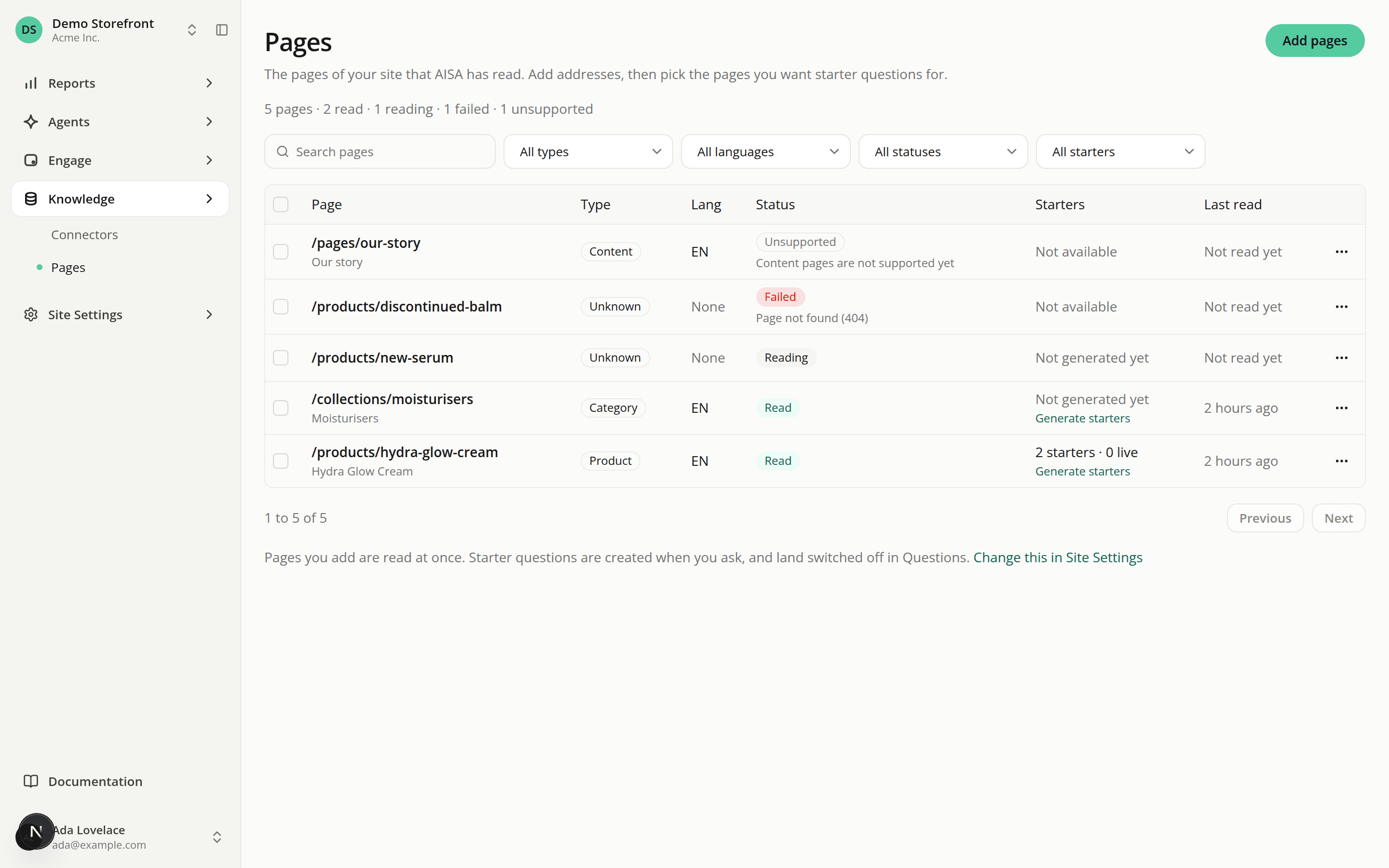
Add your product pages and let AISA read them
AddedPages is a new entry under Knowledge in the sidebar. It is where you tell AISA which pages of your site to learn from, so it can write starter questions for them.
- Add pages by hand. Click Add pages and paste one address or path per line, up to 50 at a time. The dialog shows what will happen to each line before you submit: new, cleaned, already added, not on your site, or not valid. Addresses must be
httpsand on your own site. - AISA reads each page as soon as you add it. A page shows as Reading, then Read. A page it can't use shows as Failed with the reason (not found, too slow, no readable text, redirected to another site) or Unsupported (a home page, a content page, or a language your site doesn't serve). Read again retries.
- Find and act on pages. Search by address or title, filter by type, language, status and whether questions were generated, then select up to 50 pages to read again, remove or generate questions for.
- Open a page to see what AISA read, a history of every read and generation, and how the questions written from it perform.
Two limits apply per site and per UTC day: 200 page reads and 200 pages generated for. They reset at midnight UTC. The page text AISA reads is kept with the page, and is deleted when you remove the page, delete the site or delete the organization.
Pages needs the new Site pages: View permission to open and Site pages: Edit to change anything. See Roles.
Resources